
HomePlantBot care guide
Automating for Travel: Timers, Sensors & Alerts
For plant lovers—especially those with fussy tropical or high-maintenance plants—traveling can be stressful. A few days away from your indoor jungle can mean missed watering schedules, temperature fluctuations, or even unexpected power outages that leave your greenery vulnerable.
What you’ll learn in this article
- Beginner-friendly automation tools to keep your plants alive while you travel
- How to use timers for grow lights, watering systems, and humidity control
- Which sensors can help monitor plant health remotely
- How to connect devices to apps for real-time alerts
- Suggestions for power backup and system failsafes
Affiliate disclosure: HomePlantBot may earn from qualifying purchases through the Amazon links below, at no extra cost to you.
Introduction
Thankfully, automation offers a practical solution. Whether you’re off on a weekend getaway or traveling for several weeks, simple timers, sensors, and smart notifications can make sure your plants stay healthy. No more calling friends at the last minute or coming home to wilted leaves and brown tips.
This guide offers a beginner-friendly introduction to automating plant care while you’re away. Looking for more general travel prep tips? Check out our broader guide on travelproofing your grow space.
Why Automation Can Ease Worries When You Travel
Plant care is often about routine. Missed a watering cycle? Expect drooping and yellow leaves. Forgot to run your humidifier while you’re gone? That monstera might get crispy edges. Left your grow lights off in a dark winter week? Expect slowed growth or confused blooming cycles.
Automation helps you create dependable, consistent conditions for your plants—even when you’re not there. Systems can water just the right amount, turn on grow lights for ideal daylight hours, and maintain humidity inside a closed environment. Unlike relaying care instructions to a neighbor, you won’t have to worry about someone forgetting a detail or misjudging plant needs.
Best of all, most smart systems let you check in remotely, so you can enjoy a stress-free vacation or work trip knowing your plants are thriving back home.
Implementing Timers on Lights, Pumps, and Humidifiers
The simplest form of automation is using timers to control devices your plants rely on daily. Here are three prime targets:
- Grow lights: Simulate reliable day/night cycles, especially in winter months or for windowless rooms.
- Irrigation pumps: Use small automatic pumps with tubing to slowly water potted plants on a set cycle.
- Humidifiers: Keep humidity steady for tropicals without running devices 24/7.
A digital plug-in timer or a smart plug with scheduling capacity is ideal for beginners. If you’re using multiple devices, stagger their run times to prevent overloading circuits.
| Device | Suggested Timer Type | Typical Use Duration |
|---|---|---|
| Grow Light | Digital Timer or Smart Plug | 12–16 hours/day |
| Humidifier | Smart Plug | 30 mins–4 hours, 2–3x/day |
| Water Pump | Interval Timer Plug | 1–5 min watering cycles |
Employing Sensors to Measure Soil Moisture, EC, Temperature, and Humidity
Sensors give you real-time insight into your plant environment so you can make smarter automation choices. Here are some options:
- Moisture sensors: Detect when soil is too dry or waterlogged. Great for avoiding over- or under-watering.
- EC (electrical conductivity) sensors: For more advanced users, helps detect salt or fertilizer buildup in the soil.
- Temperature and humidity sensors: Crucial for orchids, ferns, carnivorous plants, and other sensitive species.
Many budget-friendly sensors ($10–$30) provide basic readings, while premium models ($40+) integrate with smart apps and home automation systems. Most work over Wi-Fi or Bluetooth and sync with a mobile app, allowing you to track changes over time or spot high-risk conditions while you’re away.
Connecting Devices to Apps for Remote Monitoring and Alerts
Smart plugs and digital sensors are most effective when tied into a full ecosystem. Platforms like TuyaSmart, Amazon Alexa, Apple HomeKit, and Google Home allow control and monitoring from anywhere, right from your phone.
Example setup: If a humidity sensor drops below 50%, your app can automatically turn on the humidifier using a smart plug. If soil moisture drops too low, you can trigger a watering routine or send an alert.
Integration also helps with scheduling changes while you’re already away. Forgot to factor in overcast weather? Extend your grow light timer in seconds via your app. Just make sure your home’s Wi-Fi signal is strong where your devices are set up—especially in basements or distant plant corners.
Popular App Integrations
- TuyaSmart: Compatible with dozens of smart plugs and sensors
- Alexa + SmartThings: Allows custom routines based on conditions
- HomeKit (Apple): For iOS-centric tracking and robust security
Helpful products for this care problem
Helpful products for this plant care problem
If this is the issue you are solving, these tools can make the next step easier. They are optional, but they match the care problem covered in this article.
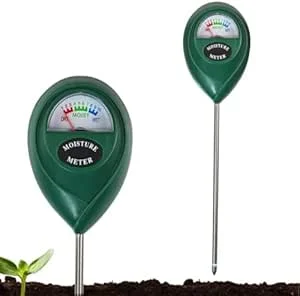 Soil moisture meterHelps check whether the root zone is actually ready for water.View on Amazon (paid link) ↗
 Digital hygrometerHelps track humidity and temperature around sensitive plants.View on Amazon (paid link) ↗Clip-on grow lightUseful for dim rooms, winter care, and plants stretching toward light.View on Amazon (paid link) ↗
As an Amazon Associate, HomePlantBot may earn from qualifying purchases.
Setting Up Notifications if Levels Become Critical
Your peace of mind increases when your system lets you know something’s off. Most apps allow you to set thresholds for key metrics:
- Soil moisture: Send a notification if it dips below 20%
- Temperature: Alert if room exceeds 85°F or drops under 60°F
- Humidity: Notify if it’s consistently below target levels
These alerts can come through push notifications, emails, or even SMS, depending on your app setup. Some advanced platforms even provide escalation, notifying additional users if an alert goes unresolved—ideal if you’re without phone service during your travel.
Planning for Power Outages and Failsafes in the System
Even the most thoughtfully planned system needs a backup. Consider these failsafes to protect your automation setup:
- Battery backups: Use an uninterruptible power supply (UPS) for water pumps or routers.
- Surge protection: Plug all devices into spike guards or surge suppressors in case of voltage spikes.
- Manual backup plan: Leave a printed care protocol with a friend or neighbor just in case your system goes offline.
Automation provides peace of mind, but combining it with simple human contingencies ensures your plants are covered on all fronts.
Testing All Equipment Thoroughly Before Leaving
Before you hand things over to tech, spend 3–5 days running your system as though you’re already away. That means:
- Double-check that your timers power lights, humidifiers, and pumps correctly and on schedule.
- Ensure sensors are syncing and reporting consistent data to your chosen apps.
- Simulate worst-case conditions: turn off your Wi-Fi for an hour, unplug your humidifier, etc. Watch how your system responds and whether alerts trigger properly.
Take photos or screenshots of all your settings. If something resets, you’ll know exactly what to restore remotely.
Weighing Costs and Complexities Against Convenience
Let’s be real: setting up automation takes an upfront investment of time and money. But weighed against the effort (and heartache) of nursing neglected plants back to health or replacing expensive varieties, it’s often worth it.
| System Type | Typical Cost | Best For |
|---|---|---|
| Basic (timers + plug-in humidifier) | $30–$100 | Weekend travelers, beginners |
| Smart (app-connected + multiple sensors/devices) | $150+ | Frequent travelers, collectors |
Over time, you’ll spend less time worrying and more enjoying both your plants and your travels.
Conclusion: Choosing the Right Level of Automation for You
From a simple grow light timer to a full smart greenhouse ecosystem, plant automation can be scaled to match your needs. Think about the types of plants you own and how often you travel. For some, a timer is enough. For others, an alert-based, sensor-driven setup might be the way to go.
However you begin, even small steps toward automation can bring big rewards. For more travel-specific preparation tips, don’t miss our full guide on travelproofing your plant space.
Once your system is dialed in, every trip becomes more relaxing—for you and your plants.
Not sure where to start?
We’re working on a downloadable checklist to help you travel-proof your grow setup from start to finish. Subscribe now to get early access when it drops!
Need help choosing the next care step?
If the symptoms in this article match your plant, use Plant Bot or the rescue checklist before buying anything. A quick diagnosis helps you fix the actual cause, not just the most visible symptom.
Quick decision checklist
- Check the growing conditions before changing everything.
- Adjust one care factor at a time.
- Use symptoms to guide the next step.
- Give the plant time to respond after corrections.