
HomePlantBot care guide
Office & Desk Setups: Eye‑Level Light & Compact Plants
Creating a healthy and inspiring workspace doesn’t require a complete renovation—often, it’s the smallest touches that make the biggest difference. Among the most effective and low-maintenance upgrades? Plants. These living companions add color and calm, and studies now show that they also help improve your mental well-being and productivity. Let’s explore the best office & desk setups: eye-level light & compact plants that keep your space green, serene, and clutter-free.
What you’ll learn in this article
- How to choose compact desk-friendly plants that thrive in limited spaces
- Where to position plants for optimal, eye-level lighting in your office
- Tips for lighting, caring for, and styling your workspace plants
- Types of plants scientifically shown to reduce stress and boost focus
Affiliate disclosure: HomePlantBot may earn from qualifying purchases through the Amazon links below, at no extra cost to you.
Introduction
The Psychological Benefits of Having Plants at Your Workspace
Even a small plant can make a big difference in the way your workspace feels. Research shows that having greenery nearby can:
- Reduce stress and anxiety
- Boost focus and attention span
- Improve creativity and mood
This ties into the concept of biophilia—our natural connection with nature. In modern offices dominated by screens and static layouts, even a desk-sized plant can satisfy that need for contact with living things. Picture this: a tiny aloe plant on your desk helping you power through the 3PM slump, or a mini snake plant softening the background of your Zoom calls.
Picking Compact Plants That Fit on Desks Without Clutter
Choosing the right plant depends on available space, light conditions, and how much maintenance you’re willing to provide. Here are top desk-sized options:
| Plant Name | Size | Care Level |
|---|---|---|
| ZZ Plant (Zamioculcas zamiifolia) | 6–12″ tall | Very low maintenance |
| Haworthia or Aloe | Under 6″ | Beginner-friendly |
| Mini Snake Plant (Sansevieria) | 6–10″ | Resilient and low-light-tolerant |
| Pothos in jars or small hangers | Trailing, adaptable | Very forgiving |
Look for plants in pots labeled 2″ to 4″ wide for true desktop sizing. If you’re new to plant selection, check out our full guide: Room-by-Room Interior Planting Guide.
Ensuring Eye-Level Light and Avoiding Screen Glare
Plants thrive when they receive light levels similar to what we use for reading—generally, soft indirect light at eye level. Keeping plants at desk-height (not under it or too high above) ensures they receive consistent light exposure throughout the day.
When placing your plant, avoid putting glossy, large-leafed varieties like rubber plants directly beside your monitor, as they can reflect light and cause glare on your screen. Instead, opt for matte-textured greenery. Here’s a quick table to guide you based on where your desk sits:
| Window Direction | Light Type | Plant Suitability |
|---|---|---|
| East-facing | Warm morning light | Most compact plants thrive |
| West-facing | Bright afternoon light | Great for snake plants or pothos |
| North-facing | Low indirect light | May require supplemental grow lights |
Helpful products for this care problem
Helpful products for better indoor light
If this is the issue you are solving, these tools can make the next step easier. They are optional, but they match the care problem covered in this article.
 Clip-on grow lightUseful for dim rooms, winter care, and plants stretching toward light.View on Amazon (paid link) ↗Digital hygrometerHelps track humidity and temperature around sensitive plants.View on Amazon (paid link) ↗
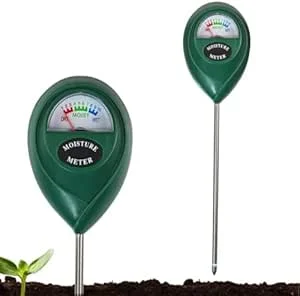 Soil moisture meterHelps check whether the root zone is actually ready for water.View on Amazon (paid link) ↗
As an Amazon Associate, HomePlantBot may earn from qualifying purchases.
Using Task Lamps or Clamp-On Grow Lights for Supplemental Lighting
If your workspace is in a darker corner or you work after sunset, a grow light can help keep your plants healthy. Look for beginner-friendly options like:
- Clamp-on grow lights: Attach to your monitor stand or shelf
- Gooseneck adjustable lights: Flexibility for spotlighting different areas
- Full spectrum LED bulbs: Use bulbs rated 5000–6500K to mimic daylight
LED grow lights are not only energy-efficient but also produce minimal heat, making them safe for use around electronics and paper items.
Arranging Plants Neatly and Utilizing Vertical Space
Don’t let your workspace feel cluttered. Use smart styling techniques to keep things aesthetically clear:
- Use uniform pots or neutral tones to reduce visual noise
- Group in odd numbers (like pairs of 3) for a natural, balanced feel
- Go vertical: Install floating shelves, pegboards with mounted planters, or even overhead macrame hangers
Try a tiered desk shelf or a corner cube organizer to create “plant cubbies” that give each plant its zone without taking up usable desk space.
Managing Watering with Saucers to Prevent Desk Damage
Water damage is one of the most common reasons people avoid keeping plants at their desks—but it’s easy to avoid with a little preparation:
- Use saucers or outer cachepots for all containers
- Water plants over the sink and allow to drip dry before returning to your desk
- Keep a microfiber cloth or protective mat nearby for occasional spills
- Try self-watering pots for added convenience
This setup minimizes the risk of water rings, mold, or wet paperwork. It also makes lunchtime watering easier to manage without making a mess.
Selecting Species Known to Improve Focus and Reduce Stress
Certain plants not only freshen the air but can also help elevate your mood and energy levels. Here are our top performers:
- Spider Plant: Great for purifying air and very forgiving to neglected schedules
- Lavender: Choose dwarf varieties for desk use—calms anxiety with its scent
- Peace Lily: Recognized for stress reduction, though it prefers bright indirect light
- Basil or Mint: Aromatic and edible—excellent for kitchen-adjacent desks or creative refreshment
These plants offer more than just greenery: they add aromatherapy, freshness, and a mental reset to help you push through stressful moments and tight deadlines.
Conclusion: Nurturing Plants to Enhance Productivity
Far from being just décor, desk plants are functional tools for better concentration, calmer moods, and healthier work habits. Start small—even a 4-inch pot with a hardy succulent can reshape the energy in your office.
Ready to take your workspace to the next level? Use this guide as your starting point, and explore our full resource on styling with greenery: Room-by-Room Interior Planting Guide.
Try adding one low-maintenance plant to your desk this week—and feel the shift.
Beginner’s Office Plant Checklist
- ☐ Place plant near eye-level light
- ☐ Choose compact or vertical style plants
- ☐ Use saucers or closed-bottom pots
- ☐ Avoid blocking screens or airflow
- ☐ Monitor weekly for water needs
- ☐ Wipe leaves occasionally for dust
Need help choosing the next care step?
If the symptoms in this article match your plant, use Plant Bot or the rescue checklist before buying anything. A quick diagnosis helps you fix the actual cause, not just the most visible symptom.
Quick decision checklist
- Increase light gradually to avoid scorch.
- Rotate the plant for even growth.
- Water less in lower light.
- Watch color and leaf posture for feedback.